SEWA Bill Payment: How to Pay Your Sharjah Utility Bill Online and Offline
If you live, work, or own property in Sharjah, keeping your SEWA bill payment up to date is essential for managing electricity, water, and piped natural gas services. Sharjah Electricity, Water and Gas Authority (SEWA) offers various options for bill checking and payment, such as the SEWA website, online payment service, the “Smart” mobile app, banking institutions, exchange centres, customer service centres, MBME kiosks, and the Digital Sharjah app.
Online payment is the easiest option for most customers. A one-time payment service is offered by SEWA, where a customer can verify an account by entering the service account number and the primary contact number, input the payment details, and confirm the transaction.
What Is SEWA Bill Payment?
SEWA bill payment means the payment of dues charged by Sharjah Electricity, Water and Gas Authority for the provision of utilities to a property.
Charges for electricity, water, and gas may be included in a SEWA bill depending on the account and premises. A SEWA bill can also include previous bill, receipts, current amount, adjustments, VAT, and due amount information, as well as info regarding the meter reading. These components are listed in the bill statement of the official SEWA tax invoices.
SEWA’s online account system also enables its customers to take care of their utility supply and pay bills. Registered consumers and owners will be able to sign up and will have access to account services; customers who must make a payment will have access to a separate payment route.
How to Pay Your SEWA Bill Online
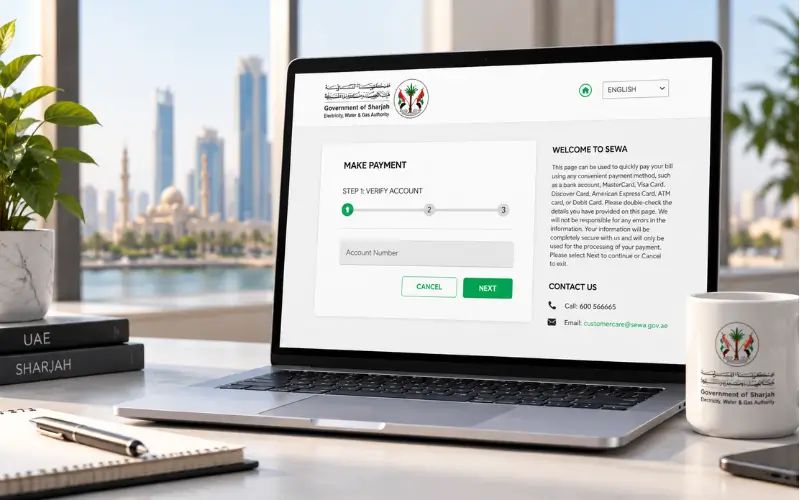
For quick Bill Settlement, SEWA has an official website that has a Make Payment service. The payment page currently being used has a service account number and a primary contact number that the customer must enter before they go to payment.
Step 1: Open the Official SEWA Payment Service
Do not use a “payment page” that is not part of SEWA’s official website. Under its electronic services, SEWA has a website where Quick Pay and Bill Inquiry are available.
The official one-time payment page consists of three phases:
- Verify account
- Enter payment details
- Review and confirm
Step 2: Enter Your Account Information
The official payment page will require your service account number and main contact number. Carefully enter the information, since the payment page asks the user to check the information before going further.
Your SEWA bill may have identifying information about your account that will help you determine which account to look for. For instance, an official SEWA invoice will show an Account No., invoice details, premise ID, and billing period.
Step 3: Verify the Account
Once you put in the requested data, ensure that the account listed belongs to the right property.
This is especially the case when you run several businesses or have just swapped houses. If you have to pay the wrong account, there is the potential for additional hassle, so check the account and the amount before authorising a payment.
Step 4: Enter Your Payment Details
Now, SEWA’s one-time payment page is available with the options: bank account, MasterCard, Visa, Discover, American Express, ATM card, and debit card.
Choose the payment option that is available and fill in the information requested.
Step 5: Review and Confirm
Always check your account and payment with your bill before submitting the transaction.
SEWA particularly urges its customers to verify the data they enter on its payment form. If it is all correct, go ahead and make the payment and keep a confirmation/receipt for your records.
Can You Pay SEWA Without Logging In?
Yes. SEWA has developed a dedicated payment page, and customers can utilize the payment service without only utilizing the full enrolled account dashboard. The official payment page asks for the service account and main contact number to confirm the account.
This is helpful when you are just looking to pay off a bill and not other types of accounts.
However, if you are a frequent SEWA user, having a customer account with SEWA can offer you more account management capabilities than you would otherwise have in your wallet. With their current portal, SEWA enables consumers and owners to track their electricity and water supply and make payments online.
How to Check Your SEWA Bill Online
It is helpful to review your bill prior to paying it, as it will verify the amount of the bill, billing period, and account information.
Bill Inquiry is an electronic service available on SEWA’s current website, along with bill-related account management available through SEWA’s online portal.
Registered users can log in to the SEWA portal and access consumption details and manage the account. The portal explicitly mentions that customers can pay the bill online and analyse the bill, which can also be used to view consumption.
The final amount is not the only thing that can be on your bill. Previous charges, receipts, current consumption, meter readings, VAT, and any applicable charges can be seen, depending on the statement.
SEWA Bill Payment Through the Smart App
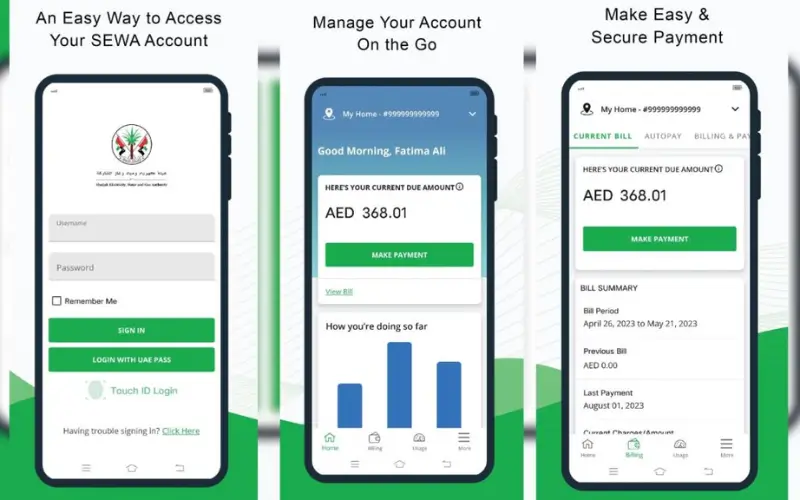
SEWA also offers a Smart App as part of its digital service offerings. The authority’s website prominently features the Smart App as well as its electronic services.
The SEWA bills are also recognized by the officials of SEWA as one of the bill-payment options as “SEWA Smart App”.
The app may prove handy to customers who want to manage their utilities from a handheld gadget instead of the website every time. Some functions may be unavailable in SEWA’s digital platforms as the organization continues to upgrade its services; customers should be mindful of the latest version of the official SEWA app and SEWA website to check the availability of functions and payment options.
SEWA Bill Payment Through Digital Sharjah
Another digital route is the Digital Sharjah App, a single digital platform for accessing government and other services.
SEWA’s existing bills list includes the Digital Sharjah App as a bill payment option.
The Digital Sharjah platform has also helped enable various payment channels, such as card and digital wallet payments. According to the report that appeared on the platform’s 2024 website of the platform, customers could avail the facility of Apple Pay, Google Pay, Samsung Pay, direct debit cards, credit cards, and Tahseel Digital Payment System.
As payment options may evolve, do not proceed with a payment once you see the payment options in the current Digital Sharjah service.
SEWA Bill Payment Through Banks
Another handy alternative is banking, especially if your customers already go through their finances via a UAE bank.
For instance, Abu Dhabi Commercial Bank (ADCB) currently has a feature available for its customers to pay bills for SEWA water and electricity via its Personal Internet Banking, Mobile Banking App, WhatsApp Banking, and SMS Banking.
The exact steps and channels may vary by bank. So customers need to utilize the bill-payment component of their own bank’s most up-to-date application or internet banking and choose SEWA as their utility provider when available.
If SEWA is not listed in your bank’s bill-payment list, be sure to pay through SEWA’s official bank payment system or through another SEWA-approved payment system.
Other Ways to Pay a SEWA Bill
Not all people are right for utilizing an online payment service. SEWA therefore offers a few offline and alternative payment options.
The service guide lists the bill payment channels as SEWA customer service centres, approved banks, approved exchange centres, Etisalat ATMs, and UAE Post.
Even the branch offices, banks and exchange channels, MBME kiosks, SEWA website, the SEWA Smart App and Digital Sharjah App are mentioned as payment options in the current SEWA bill statements.
SEWA Customer Service Centres
New customers who require help can drop by the SEWA customer service center. This may be helpful if there is a problem with an account, payment, and/or billing information that cannot be addressed online.
Customer service centres are mentioned as a payment channel in SEWA’s official service documentation.
Banks and Exchange Centres
If a customer prefers to pay in person, or would not like to pay via the online portal, they can choose to pay via an approved bank/exchange centre.
Please make sure that the bank/exchange centre you are planning to visit is able to accept SEWA bills, as the list of banks/exchange centres that accept SEWA bills can change.
MBME Kiosks
The current bill statements of SEWA indicate that the MBME kiosks are part of the payment options.
Self-service payment points may be helpful if you prefer not to go to a branch or pay online for payment.
What Information Do You Need for SEWA Bill Payment?
The most critical data for online payments is your SEWA service account number and the contact details you will be asked for by the payment service.
The official page of SEWA’s one-time payment explicitly requests the account number and the main contact number.
Also, it is wise to have the latest bill on hand so one can compare:
- Account information
- Billing period
- Amount due
- The sum of the previous balance/receipts.
- Current charges
- Taxes or adjustments that are applicable.
The fields included on a bill may differ based on the account and services provided.
What Does a SEWA Bill Include?
The more you understand about the bill, the more likely you are to spot an unusually large one.
All SEWA bills include separate details of services like electricity, water, and gas, and consumption data is provided if applicable, with meter reading data included as well. They can also display previous bills, receipts, current charges, service charges, adjustments, VAT, and total due.
Before comparing the bill, if it is higher than usual, check the consumption and readings of the previous month. If there is a significant change in consumption, this may be due to that reason; if not, it may be worth contacting SEWA, as it may be a genuine discrepancy.
What Should You Do If Your SEWA Payment Fails?
If the payment fails, this doesn’t necessarily mean that the bill has been paid or the amount deducted successfully.
Always see if your bank or credit card statement indicates a transaction has been completed. Then go back to check the SEWA account again and find out if payment has been made.
In case the deduction amount went through but the SEWA account shows no transaction, retain the transaction reference, payment confirmation, and account details. If the problem persists, call SEWA customer care.
Currently, SEWA has the following numbers: 600 566665 for inquiries and 991 for emergencies.
Do not repeatedly submit the same payment until the original payment is confirmed, since it may lead to duplicate payment issues.
Is SEWA Bill Payment Available for Electricity, Water and Gas?
Yes. SEWA provides electricity, water, and piped natural gas services to residents of Sharjah, and electricity bill payment is described in the service documentation.
But the services listed on a customer’s specific bill are based on their account and property. One customer may thus be billed for electricity and water services, without being charged for gas, whereas another customer may be charged for all three services.
How to Avoid Problems When Paying a SEWA Bill
It is easy to pay your SEWA bill, but there are a few things you can do to avoid paying the bill incorrectly or late.
- Please verify the account number prior to payment.
- Check off the total bill and property information.
- Do not use unofficial SEWA or payment channels.
- Be sure to retain the receipt for payment until the payment is verified.
- If you have several properties, be sure to choose the right account.
- Even if you’ve set up automatic or recurring payments, review your bills frequently.
To ensure your SEWA payments are accurate and hassle-free, try to follow these steps:
Conclusion
Customers can pay SEWA bills using a number of channels, the official SEWA website being one of the easiest to access if they wish to pay online. It also supports its Smart App, Digital Sharjah App, banks, exchange centres, branches and MBME kiosks.
Please check SEWA account number, property information and amount due before paying. Once paid, hold on to the receipt until the transaction is properly reflected. For payments/billing problems not addressable online, SEWA’s Customer Care Team can be contacted on 600 566665.
Also Read: Labour Card Check in UAE: How to Check Your Labour Card Online
Frequently Asked Questions
How can I pay my SEWA bill online?
Payment of SEWA bills can be done online via the official website of SEWA with the service account number and primary contact number.
Can I pay my SEWA bill without logging in?
Yes. You can pay for SEWA without logging in; it’s a one-time payment option.
What is required for SEWA online payment?
To obtain information, you must have your SEWA service account number, primary contact number, and a valid payment method.
How do I check my SEWA bill?
To view your bill, use SEWA’s Bill Inquiry service or log in to your SEWA online account.
Can I pay my SEWA bill through a bank?
Yes. Payment is made through the authorized banks and bill payment services provided by them.
Can I pay SEWA through the Digital Sharjah App?
Yes. SEWA bill payments are supported by Digital Sharjah.
Can I pay my SEWA bill through the SEWA Smart App?
Yes. You can pay your bill via the SEWA Smart App.
Where can I pay my SEWA bill in person?
Payment can be made at SEWA branches, approved banks, exchange centres, and MBME kiosks.
What should I do if my SEWA payment fails?
Check your bank transaction and SEWA account first. Contact SEWA Customer Care at 600 566665 if money is deducted, but the payment is not reflected.
What is the SEWA emergency number?
If you are in an emergency, please dial SEWA’s emergency telephone number: 991.
Does a SEWA bill include electricity, water and gas?
SEWA offers electricity, water and piped natural gas services. Your bill is based on what services are attached to your account.