NBAD Balance Check: How to Check Your Balance Today
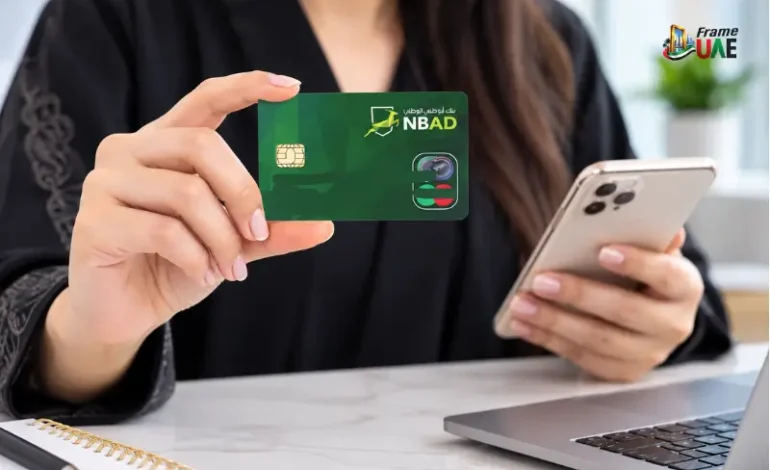
Searching for an NBAD balance check can be confusing because National Bank of Abu Dhabi (NBAD) no longer operates under its former name. In 2017, NBAD joined forces with First Gulf Bank to become First Abu Dhabi Bank (FAB). Accordingly, when a customer requests an account or card balance from the old NBAD, he or she typically must opt for the current FAB service that is specific to the type of card or account.
The key difference is between a prepaid card and an FAB bank account. FAB will guide Ratibi cardholders to a prepaid card balance enquiry service, and FAB regular account holders can check the balance via FAB Mobile. This article tries to explain both ways, what information is required, and what to do if the balance you see is not what you expect.
What Does an NBAD Balance Check Mean Today?
The term NBAD balance check is still in use and is commonly used by many as a reminder of their banking relationship with the National Bank of Abu Dhabi. In 2017, NBAD and First Gulf Bank merged, and the merged bank was known as First Abu Dhabi Bank (FAB). FAB has its own NBAD archive and considers the former NBAD itself to be a part of its history.
Thus, be wary of an NBAD mobile service just because your card or account was registered for NBAD. The right way will depend on the kind of product that you have now.
FAB Mobile gives access to account info and balances for a normal FAB current or savings account. When using FAB as a service for a Ratibi prepaid card, FAB offers a separate online balance enquiry page which redirects the user to the official balance enquiry page of the prepaid-card provider, Magnati.
How to Check an NBAD or FAB Prepaid Card Balance Online
The dedicated prepaid-card enquiry service is the most relevant if your card with the NBAD is used as a FAB prepaid or Ratibi card.
The Ratibi Prepaid Card Balance Enquiry link is currently on FAB’s page. The link will take you to the official Prepaid Cards Enquiry page at ppc.magnati.com.
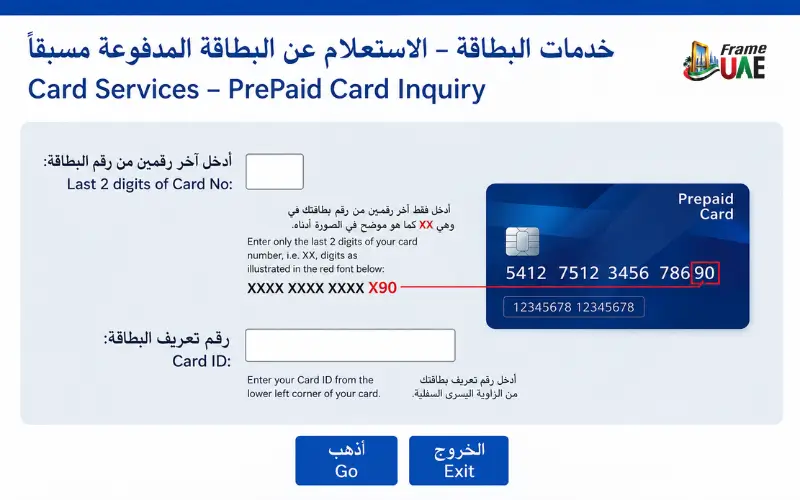
To check the balance:
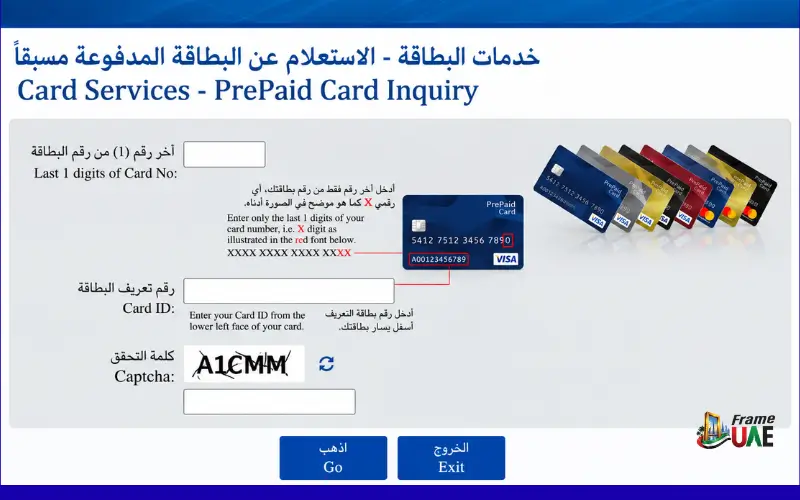
- Open the official Prepaid Card Enquiry page.
- Enter the last four digits of your card number.
- Enter your card ID.
- Enter the displayed CAPTCHA.
- Select Go to submit the enquiry.
The last four digits of the card, the Card ID, and the CAPTCHA are displayed on the enquiry page. So, a website that requests your mobile number or Emirates ID only for this particular enquiry shouldn’t be considered the official procedure unless FAB makes changes to the service.
What You Need for the Prepaid Balance Enquiry
Currently, there are three fields that the official page asks for:
- The last 4 digits of a card number.
- Card ID
- CAPTCHA verification
The enquiry page does not require you to type your entire card number into the visible balance check form.
This distinction is important because many pages online tell you about old or other ways of doing things, but don’t tell you if they still fit. If you have an NBAD balance check for a FAB prepaid card, the best place to go is the official FAB Ratibi page and the enquiry service that is linked to it.
NBAD Balance Check Through FAB Mobile
If you have a regular FAB bank account, not a Ratibi prepaid card, your best option is FAB Mobile.
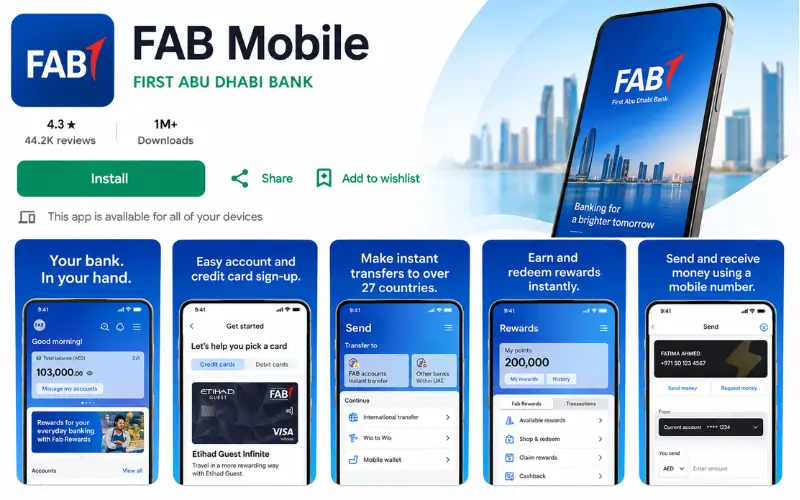
According to FAB, its mobile banking app enables customers to oversee accounts and cards and keep track of their balances. It’s also available as a personal banking service on the page of its current services on the service-status app, which includes viewing account balances and account history.
To use this method, existing FAB customers need to register for FAB Mobile. FAB states that the process of registration may be done by a customer number, which is sent to the registered e-mail address, or by a suitable smartphone, a debit card number, or a Credit Card number, in addition to a secure internet connection.
After signing up, you have access to your banking details. According to the app, FAB is a mobile phone application that allows you to manage accounts, debit cards, and credit cards and view balances.
What If You Used NBAD Online Banking Before?
If you are an old customer of NBAD, you might recall accessing your account information via the old bank’s online banking portal. Current NBAD customers need to access FAB’s current digital banking platforms instead of looking for a new platform to bank in the modern era.
FAB currently offers mobile banking and online banking services, with some banking services having increasingly migrated to FAB Mobile. According to FAB, some banking services were made available only via its mobile app from 1st October, 2025.
FAB Mobile is thus the current digital channel that FAB has specifically designated as the channel for viewing account balances and transaction history for a simple balance enquiry.
NBAD Balance Check for Ratibi Salary Cards
One of the main reasons why people are searching for NBAD balance check is to check if their salary has come on a prepaid card.
The Ratibi Payroll Prepaid Card is FAB’s salary payment solution for employees who make a salary of AED 5,000 or less. FAB states that Ratibi enables qualified staff to get their pay cheques on the card instead of having to have a traditional bank account.
FAB also claims they send free SMS message alerts to Ratibi cardholders on each and every salary credit. The card can be used at ATMs, stores, and online, and FAB says it is a salary solution that meets the requirements of the UAE Wages Protection System.
The dedicated prepaid enquiry page is very useful for the Ratibi Cardholder if they have any immediate queries related to their salary, such as a query on whether the salary has been credited or how much money is still available for the cardholder.
Why Ratibi Is Different From a Normal Bank Account
A Ratibi card is not just another account, such as a current or savings account, but rather it is a prepaid payroll card. Again, this is a salary payroll service that FAB particularly calls “without a bank account.
That is why it’s important to find the balance using a typical bank account instruction. If you receive a salary via Ratibi, please use the prepaid-card enquiry service on the Ratibi page on FAB’s website.
What If the Salary Is Not Showing in the Balance?
The problems of missing salary and balance checks are not the same.
First, make sure that you are verifying the proper product. If you have a Ratibi card, ensure you use the prepaid enquiry service, and do not assume that a regular FAB account balance screen will display the salary. FAB verifies that Ratibi is meant for crediting wages straight to the prepaid card.
Then, see if you got salary credit SMS notification. The free SMS alerts that FAB provides on each salary credit are considered to be Ratibi benefits. If the expected credit has not been received, please contact your employer, as FAB states that the point of contact between your employees and the bank is the employer, relating to the Ratibi-related procedures.
If the problem cannot be resolved, you may reach out to FAB’s customer support. The bank’s current phone numbers are: 600 52 5500 (within the UAE) and +971 2 681 1511 (outside the UAE). FAB has its contact centre in the UAE open around the clock.
FAB Balance Check Through Customer Support
In situations where the online enquiry isn’t working, your card details aren’t being accepted, or when you need some help in establishing which banking service is correct, calling FAB can help.
Customers in the UAE can contact FAB by calling 600 52 5500, and customers outside the UAE can call +971 2 681 1511. According to the bank, the UAE contact centre is also available round the clock.
For calling: always contact the official contact provided by FAB. Avoid phone numbers found on unofficial websites, social media posts, or advertisements.
Customers are also advised against responding to a suspicious SMS or email that asks them for account information or one-time passwords from the bank, FAB has cautioned.
Can You Check an NBAD Balance at an ATM?
ATMs apply to FAB and Ratibi cards, but the options available for balance enquiries may differ depending on the card and the ATM network.
FAB confirms that the Ratibi cards will be accepted at ATMs, and Ratibi holders will be allowed to choose their PIN from FAB ATMs. The existing Ratibi page, however, contains a special link for cardholders to access the account balance enquiry service through the Internet.
Hence, a dedicated online enquiry page is the most evident officially recorded way of checking a Ratibi balance. I don’t know if all ATMs offer the same balance enquiry screen for every prepaid card as of now from FAB’s public Ratibi page.
NBAD Balance Check: Regular Account vs Prepaid Card
The most effective means of avoiding confusion is to be aware of the kind of banking product that you have.
| Your product | Current balance-check route |
| Former NBAD regular account now with FAB | FAB Mobile |
| FAB current account | FAB Mobile |
| FAB savings account | FAB Mobile |
| Ratibi payroll prepaid card | FAB’s Prepaid Card Balance Enquiry |
| Other FAB prepaid card | Use the applicable prepaid-card enquiry service |
| Problem accessing the service | Contact FAB customer support |
FAB explicitly marks FAB Mobile as an account balance enquiry, whereas its Ratibi page offers the separate prepaid balance-enquiry link.
This can be more precise than considering all searches for NBAD balance check as an identical process.
Is There Still an NBAD Bank in the UAE?
The current retail bank service should not be considered the continuation of the old NBAD. In 2017, National Bank of Abu Dhabi and First Gulf Bank merged to become First Abu Dhabi Bank. The transaction was noted in FAB’s own merger archive, which states that the new company’s name was eventually changed to First Abu Dhabi Bank.
The current corporate information also reflects the presence of NBAD in FAB’s history, and its archive remains open to historical NBAD reports and records.
Thus, people still search for the service described by the keyword NBAD balance check, which is related to their old bank. Generally, the current service should be identified by FAB.
Why You May See Different NBAD Balance-Check Instructions Online
The term NBAD will be found in older documents, archived pages, and third-party articles, so it is difficult to distinguish the results of searches for this term.
Others have multiple products under a single term, like regular bank accounts, prepaid cards, and Ratibi payroll cards. This may make an apparently simple enquiry about a balance unnecessarily complicated.
It is best to follow the instructions, as it is the product. The current FAB website is also helpful because it links Ratibi cardholders directly to the prepaid enquiry website and is able to separately record the balance checked using FAB Mobile.
Security Tips for Checking Your FAB Balance
Only input banking info on an official service.
To do an enquiry on Ratibi’s balance, visit FAB’s Ratibi page and use the Prepaid Card Balance Enquiry link. This link at present points to Magnati’s prepaid-card enquiry web page.
Here are some precautions to keep in mind:
- If someone contacts you out of the blue, do not give them your OTP, PIN, or card number.
- Verify that the URL of the website before entering data is correct: FAB or prepaid-card service.
- Never use links that are sent through unsolicited SMS, WhatsApp or email messages.
- If you have any concerns as regards fraud, call FAB directly, using the published customer-support number.
FAB particularly cautions its customers to avoid revealing account information and OTP with unknown individuals claiming to be from the bank on SMS, WhatsApp or email.
Conclusion
The following is an NBAD balance check, which is essentially the same as the FAB balance check, but the correct procedure varies by product. The old NBAD customers of a regular account should use the banking channels that FAB currently offers, while the customers of the prepaid cards and the ones using the Ratibi service are provided with a balance-enquiry service that can be reached directly from the FAB official website.
The current online enquiry for the Ratibi card is for the last four digits of the card and Card ID/CAPTCHA. FAB Mobile offers balance and transaction history for regular FAB accounts. Either route may fail, and FAB’s UAE contact centre is available 24 hours a day at 600 52 5500.
Read Also: Labour Card Check in UAE: How to Check Your Labour Card Online
Frequently Asked Questions
Is NBAD the same as FAB?
Yes. In 2017, NBAD merged with First Gulf Bank to become First Abu Dhabi Bank (FAB).
How can I check my NBAD balance online?
The regular accounts use FAB Mobile. Ratibi cardholders can use FAB’s Prepaid Card Balance Enquiry service.
How do I check my Ratibi card balance?
Fill in the last 4 digits of your card, Card ID, and CAPTCHA on the official prepaid-card enquiry page.
Can I check my FAB balance through the mobile app?
Yes. Customers can check their account balances and transactions with FAB Mobile.
Can I check my Ratibi balance without a bank account?
Yes. Ratibi is not a bank account, but rather a prepaid payroll card.
What do I need for a Ratibi balance check?
The last 4 numbers on your card, Card ID, and the CAPTCHA are required.
What if my salary is not showing on my Ratibi card?
The first thing to consider is the balance and salary SMS alert. If it is still not received, inform your employer or FAB.
What is the FAB customer-care number in the UAE?
Call 600 52 5500 from within the UAE. FAB states that its UAE contact centre is open 24/6.
Can I check my FAB balance outside the UAE?
Yes. FAB Mobile is available for use, without the need for a SIM card, outside the UAE with an internet connection.
Is there a separate NBAD mobile app?
No, the banking services are offered through First Abu Dhabi Bank (FAB).


1 Comment
[…] Also: NBAD Balance Check: How to Check Your Balance Today Labour Card Check in UAE: How to Check Your Labour Card […]